Wiki/Slash Commands
#Slash Commands
##General
All slash commands for OakInterruptsDisplay are accessed through the root command \oi, which is then followed by the desired command and its subcommands/flags/arguments. If you are familiar with the syntax commonly used to describe to usage of *nix command line utilities you can skip the syntax description, just note that italics are used to represent an argument that is not a predefined flag.
##Syntax
- Brackets ( '[' and ']' ) are used to enclose one or more optional arguments
- Braces ( '{' and '}' ) are used to enclose one or more required arguments
- A pipe ( '|' ) is used to separate different options in a list of arguments, where you can only choose one
- Italics are used to denote a value, e.g. a number or string, with non-italic arguments being predefined flags
##Commands Note that all names of lists are case sensitive.
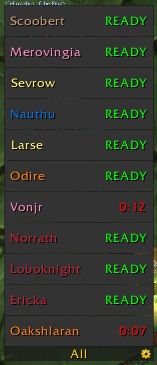
new [list-name]Creates a new list named name. Any interrupters currently exported by OIB will populate the list, but new interrupters will not be added automatically.deletelist-name Deletes the given list.showlist-name Shows the given list.hidelist-name Hides the given list.refilllist-name Adds all interrupters exported by OIB who are not currently in the list.autofilllist-name Make a list automatically include new interrupters exported by OIB.noautofilllist-name Stop a list from automatically including new interrupters.renamelist-name new-name Rename a list.announcelist-name Cause a list to behave as a rotation, as well as announce interrupters.rotationlist-name Cause a list to behave as a rotation, but without announcing.norotationlist-name Turns off rotation/announce behaviour.sharelist-name Share a rotation order with your group (the list must be a rotation). Group members will automatically have a display created with the given rotation.debug [level]Turns on debugging output at the given (integer) level; this causes messages to be printed to help identify bugs. If no level is given the current level is printed; a level of 0 stops debugging output.grow { up | down }list-name Set the direction a list will grow.locklist-name[ combat ]Locks a list. If thecombatflag is provided this will also lock the order of the list.unlocklist-name[ combat ]Unlocks a list. If thecombatflag is specified then the order of the list is unlocked.bindlist-name Make a list use the reset key bind.nobindlist-name Make a list not use the reset key bind.listLists the names of all displaysconfig { ON | OFF }The ON flag turns on config mode, showing all displays; the OFF flag turns config mode off, hiding the displays again.
Comments