
Prat 3.0
In loving memory of Jon Akthar (Sylvanaar)
Hello WoW community, I'm LuciferCatnip, Sylvanaar was my coworker and my mentor. It goes without saying that Jon was an amazingly talented individual. He always seemed to know everything… but he once said to me "It's not about knowing the answers, it's about asking the right questions", he always challenged me to ask me the right questions until I would arrive at the answer on my own terms. Jon was also a champion of the open source movement, and so with special thanks to Gil from Curseforge as well as Sylvanaar's family, there's no better way to honor Sylvanaar's legacy than to keep his project going strong in the community.
If you'd like to help maintain Prat, please reach out to MysticalOS or LuciferCatnip directly. Thank you so much.
About
Prat-3.0 is a chat enhancement addon for World of Warcraft.
It is made up of 30+ smaller "modules" which each provide additional functionality, and can be enabled or disabled individually.
In game, type /prat for a menu. Or use the icon on one of the many data broker hosts.
Prat has just about every feature you can think of, and then some. Really. When I get some more time, I'll try and put together a full list (Even I have lost count)
(Thanks to Dreamsight for this partial list)
- Sync your chat settings across your account (Beta)
- Machine learning powered spam filter (Beta)
- Change arrows, buttons, mouse scroll for chat scroll, scroll speed
- you can add player color per channel, color per level, color per class
- timestamps (styled)
- Whether to show timestamp (what format the timestamp should be in)
- Whether to show players level
- You can select the option for channel "stickys" (last channel you used you auto use when hitting enter, that sort of thing – or last thing someone said)
- Change the looks of the chat's editbox - as well as where it appears (you can even undock it and move it to where you'd like it to be)
- Chat fading, fading delay
- You can change the font to a list of fonts, add an outline to it, monochrome it (if you don’t mind messing with files a bit you could probably even add other fonts to that list)
- Change the chat frame/chat box appearance
- Keep chat history between game sessions
- Set channel abbreviations
- Set brackets and color(or something instead of brackets)round player/lvl
- Alt invite option (press keyboard “alt” button and click on the player’s name to auto inv them)
- Raid icon
- Invite links - click them to invite the person
- URL copying
- Full chat copying + copy button
- Click timestamp to copy line
- Configurable alerts when your name or other word is mentioned
- Enables tell target /tt which whispers your target
- Alias options - make macros into short commands
- See names of players Alt characters
- Change chat sounds (incoming and outgoing as well as per channel)
- Achievements info and grats
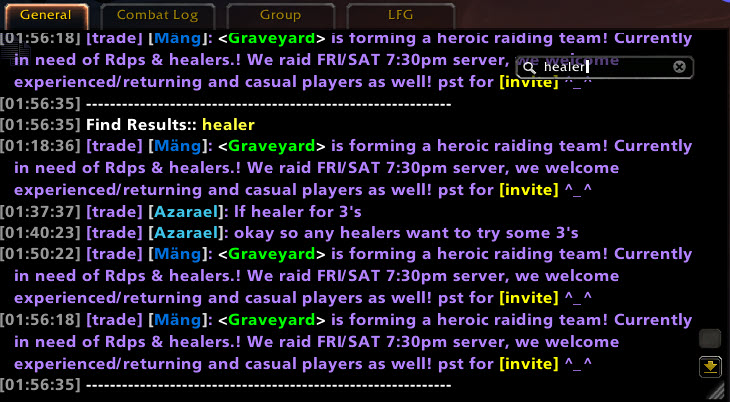
- Full chat search and search box
- Customizable filters for advanced users
- Show item icon next to item links and player class icon next to player names
- Icon-only options for newcomers chat
- Optional flashing or font color change for chat tabs when a new message comes in.
You can enable/disable all Prat modules - don't have to have the ones you don't use running
While trying to reduce resource utilization, it is also important to note that some people prefer the features, and don't care that an addon uses 500k more.
Comments

-

QTartemis Owner
-

humfras Former Author
-

lucifercatnip Author
-

MrFIXlT Former Author
-

MysticalOS Author
-

pompachomp Former Author
-

SunnySunflow Translator
-

sylvanaar Former Author
-
View User Profile
-
Send Message
Posted Aug 15, 2026If anyone is getting random machine gun style LUA errors shut off ALL fading features from your chat. Bartender had an issue, and its possible this one is also having the same problem. They really messed with the UI this time. Thanks blizzard.
-
View User Profile
-
Send Message
Posted Aug 16, 2026@voidster1234 Should now be resolved :)
-
View User Profile
-
Send Message
Posted Aug 14, 202696x ...izzard_ChatFrameBase/Mainline/ChatFrameOverrides.lua:295: attempt to index local 'discordInfo' (a nil value)
[Blizzard_ChatFrameBase/Mainline/ChatFrameOverrides.lua]:295: in function 'MessageEventHandler'
[Prat-3.0/addon/addon.lua]:622: in function <Prat-3.0/addon/addon.lua:542>
[tail call]: ?
[Scrap/addons/main/main.lua]:276: in function 'Print'
[Scrap/addons/main/main.lua]:265: in function 'PrintMoney'
[Scrap/addons/merchant/button.lua]:214: in function 'Sell'
[Scrap/addons/merchant/button.lua]:51: in function <Scrap/addons/merchant/button.lua:49>
[tail call]: ?
[C]: ?
[Masque/Libs/CallbackHandler-1.0/CallbackHandler-1.0.lua]:19: in function <...que/Libs/CallbackHandler-1.0/CallbackHandler-1.0.lua:15>
[Masque/Libs/CallbackHandler-1.0/CallbackHandler-1.0.lua]:54: in function 'Fire'
[Scrap/libs/WildAddon-1.1/WildAddon-1.1.lua]:138: in function 'SendSignal'
[Scrap/addons/main/main.lua]:43: in function <Scrap/addons/main/main.lua:42>
Locals:
self=ChatFrame1 <FloatingChatFrame.xml:645>{
oldestFadingLineTimestamp=24214.466000
systemInfo=<table>
fadeDurationSecs=3
shouldFadeAfterInactivity=true
buttonSide="left"
checkedGMOTD=true
textIsCopyable=false
overrideFadeTimestamp=24214.466000
dirtySettings=<table>
hasActiveChanges=false
system=8
isScrollingMessageFrame=true
allowAtGlues=true
ScrollBar=Frame <ChatFrame.xml:5>
isUninteractable=false
Background=ChatFrame1Background <FloatingChatFrame.xml:6>
mouseOutTime=1.004000
editBox=ChatFrame1EditBox <FloatingChatFrame.xml:496>
downKeys=<table>
ScrollToBottomButton=Button <FloatingChatFrame.xml:475>
buttonFrame=ChatFrame1ButtonFrame <FloatingChatFrame.xml:455>
name="General"
defaultLanguage="Orco"
snappedFrames=<table>
isInitialized=1
isDocked=1
settingDisplayInfoMap=<table>
ResizeButton=ChatFrame1ResizeButton <FloatingChatFrame.xml:416>
clickAnywhereButton=ChatFrame1ClickAnywhereButton <FloatingChatFrame.xml:403>
systemPositionDirty=false
alternativeDefaultLanguage="Orco"
hasOwnFontObject=true
allowScroll=true
oldAlpha=0.682353
channelList=<table>
FontStringContainer=Frame <ScrollingMessageFrame.xml:9>
messageTypeList=<table>
savedSystemInfo=<table>
timeVisibleSecs=120
fontObject=table: 0000017E2B9611A0 <UnknownFile:0>
systemNameString="Marco de chat"
mouseInTime=0
zoneChannelList=<table>
EditModeResizeButton=Button <EditModeSystemTemplates.xml:173>
insertMode=2
Selection=Frame <EditModeSystemTemplates.xml:167>
onDisplayRefreshedCallbacks=<table>
visibleLines=<table>
scrollOffset=0
settingMap=<table>
settingsDialogAnchor=<table>
historyBuffer=<table>
isStaticDocked=true
isLocked=true
}
event="CHAT_MSG_MONEY"
arg1="Has vendido basura por un valor de: 74|TInterface\MoneyFrame\UI-GoldIcon:0:0:2:0|t 61|TInterface\MoneyFrame\UI-SilverIcon:0:0:2:0|t 31|TInterface\MoneyFrame\UI-CopperIcon:0:0:2:0|t"
arg2=""
arg3=nil
arg4=""
arg5=nil
arg6=nil
arg7=nil
arg8=nil
arg9=nil
arg10=nil
arg11=nil
arg12=nil
arg13=nil
arg14=nil
arg15=nil
arg16=nil
arg17=nil
arg18=nil
type="MONEY"
info=<table>{
colorNameByClass=false
r=1
id=29
g=1
flashTab=false
ignoreChatTypeProcessing=false
sticky=0
flashTabOnGeneral=false
b=0
}
discordInfo=nil
(*temporary)="MONEY"
(*temporary)=nil
(*temporary)=nil
(*temporary)=nil
(*temporary)=nil
(*temporary)=nil
(*temporary)=nil
(*temporary)=nil
(*temporary)=nil
(*temporary)=nil
(*temporary)=nil
(*temporary)=nil
(*temporary)=nil
(*temporary)=nil
(*temporary)=nil
(*temporary)=nil
(*temporary)=nil
(*temporary)=nil
(*temporary)=nil
(*temporary)=nil
(*temporary)=nil
(*temporary)=nil
(*temporary)=nil
(*temporary)=nil
(*temporary)=nil
(*temporary)=nil
(*temporary)=nil
(*temporary)=nil
(*temporary)=nil
(*temporary)="attempt to index local 'discordInfo' (a nil value)"
-
View User Profile
-
Send Message
Posted Aug 16, 2026@JimmyFord This is a known issue within Scrap addon itself, nothing to do with Prat. https://github.com/Jaliborc/Scrap/issues/312
-
View User Profile
-
Send Message
Posted Aug 13, 2026i log on... sure is quite today... an hour later... it's really quit today.... 2 hours later..... hello anyone out there hello?????
-
View User Profile
-
Send Message
Posted Aug 13, 2026Hello, love the mod, just fyi on the new alpha version on TBC Anniversary, it constantly errors this. I just reverted back to release and is fine but just letting you know since you're working on it. Thanks!
457x Prat-3.0/services/chatsections.lua:241: attempt to index local 'discordInfo' (a nil value)
[Prat-3.0/services/chatsections.lua]:241: in function 'SplitChatMessage'
[Prat-3.0/addon/addon.lua]:574: in function <Prat-3.0/addon/addon.lua:542>
[tail call]: ?
[Blizzard_ChatFrameBase/Shared/ChatFrame.lua]:14: in function 'OnEvent'
[Blizzard_ChatFrameBase/Classic/FloatingChatFrame.lua]:125: in function <...Blizzard_ChatFrameBase/Classic/FloatingChatFrame.lua:124>
[Blizzard_CombatLog/Classic/Blizzard_CombatLog.lua]:2873: in function <...ns/Blizzard_CombatLog/Classic/Blizzard_CombatLog.lua:2869>
-
View User Profile
-
Send Message
Posted Aug 16, 2026@jessebanks Should now be resolved :)
-
View User Profile
-
Send Message
Posted Aug 13, 2026Thanks for amazing addon!
Please tell me would it be possible to give each player name in Whispers a different (random) color , to make it easier to see who is whispering what when whispering with multiple people at once?
-
View User Profile
-
Send Message
Posted Aug 11, 2026With the recent update to Discord Integration, will Prat be updated to show the Discord icon with Guild Chat? Right now it does not seem to display.
-
View User Profile
-
Send Message
Posted Aug 13, 2026@Gaiazelle In the latest alpha, I have started prep work for discord support and whatnots.
-
View User Profile
-
Send Message
Posted Aug 4, 2026Timestamp for chat box is fine but for guild chat (default J button) seems not working. Always modify to "none" by modules.lua:104
-
View User Profile
-
Send Message
Posted Aug 4, 2026@baldStraightIron Even I change chat timestamps format from ESC-Social-Chat timestamps then every time it gets back to none by that lua.
-
View User Profile
-
Send Message
Posted Aug 13, 2026@baldStraightIron This is now fixed in the latest alpha
-
View User Profile
-
Send Message
Posted Aug 3, 2026Heyo,
After the 3.9.103 version, no messages gets saved in chat while doing an encounter, whether its a boss or m+ dungeon.
```
x410 Interface/AddOns/Prat-3.0/services/classcolor.lua:29: attempted to index a table that cannot be indexed with secret keys
Stack: [Interface/AddOns/Prat-3.0/services/classcolor.lua]:29: in function 'GetClassColor'
[Interface/AddOns/Prat-3.0/services/helpers.lua]:93: in function 'GetDecoratedSenderName'
[Interface/AddOns/Prat-3.0/services/chatsections.lua]:241: in function 'SplitChatMessage'
[Interface/AddOns/Prat-3.0/addon/addon.lua]:574: in function <Interface/AddOns/Prat-3.0/addon/addon.lua:542>
[tail call]: ?
[Interface/AddOns/Blizzard_ChatFrameBase/Shared/ChatFrame.lua]:14: in function 'OnEvent'
[Interface/AddOns/Blizzard_ChatFrameBase/Mainline/FloatingChatFrame.lua]:143: in function <...lizzard_ChatFrameBase/Mainline/FloatingChatFrame.lua:142>
```
-
View User Profile
-
Send Message
Posted Aug 4, 2026@Discomanco Fixed in the latest alpha.
-
View User Profile
-
Send Message
Posted Aug 2, 2026Hello !
Sadly, the "double server name" display issue is back, i don't know what's causing it, as it doesn't seem to happen very consistently (some people appear with server name as it should, some with double server name, on the same channels).
FYI i'm using the french client and the latest update.
Thanks for your amazing work on Prat ! :)
-
View User Profile
-
Send Message
Posted Aug 4, 2026@Silmachoute Hi there, This is a known blizzard bug, as it can VERY often happen inside of the guild and community frame, which Prat doesn't touch or modify at all.
-
View User Profile
-
Send Message
Posted Aug 1, 2026hello, after last 1.15.9 update, prat has taken over player name color in chat. Now I can not change shamman name into blue anymore nomatter using what single addon.. hope fix!
-
View User Profile
-
Send Message
Posted Aug 1, 2026@WayneSun oh, just found 3.9.103 has fix this problem!
-
View User Profile
-
Send Message
Posted Aug 1, 2026why is prat not taking over default wow chat?